
Hello Everybody,
In these two series, I want to walk you through how CI/CD works for Microsoft Fabric deployments. This is a topic that comes up a lot, and I think the best way to understand it is to start from scratch and build up step by step. In this first part, we will cover the fundamentals: what CI/CD means in the context of Fabric, why it matters, and how the basic building blocks fit together. In Part 2, we will go hands-on with Azure DevOps, the fabric-cicd Python package, parameter files, and a full end-to-end deployment walkthrough.
If you are working with Microsoft Fabric and your team is still deploying things manually, copying items between workspaces, or making changes directly in production, this article is for you.
Why CI/CD matters for Microsoft Fabric
Let me start with the problem. When teams first start working with Microsoft Fabric, things usually begin small. Someone creates a Report, DataFlow or Notebook in a workspace, builds a data pipeline, maybe sets up a Lakehouse and a few reports. Everything lives in one place, and everyone works in the same workspace. It works fine at first.
Then the team grows. More people start making changes. Someone accidentally overwrites a colleague's work. A Notebook that was working yesterday breaks because someone modified a shared Lakehouse schema without telling anyone. A report gets updated in production at 2 PM and the dashboard goes blank during a leadership meeting. These things happen, and they happen more often than people like to admit.
This is exactly the kind of problem that Git integration and CI/CD solves. I am not going to spend time explaining what CI/CD means here, there are thousands of articles and resources out there that cover the basics. If you need a refresher, a quick search or even an AI summary will get you up to speed in minutes.
What matters for this article is what CI/CD does for you in the context of Fabric. It gives you a structured way to move your Notebooks, Data Pipelines, Semantic Models, Reports, and other items from a development workspace to a test workspace and eventually to production. Instead of making changes directly in production Fabric Workspace, you work in a lower environment, test your changes, and promote them when they are ready. If something goes wrong, you know exactly what changed, when it changed, and who changed it.
The Basics You Need to Know
Before we get into the details, let me explain a few concepts that come up repeatedly. Here is a visual of how they relate to each other:
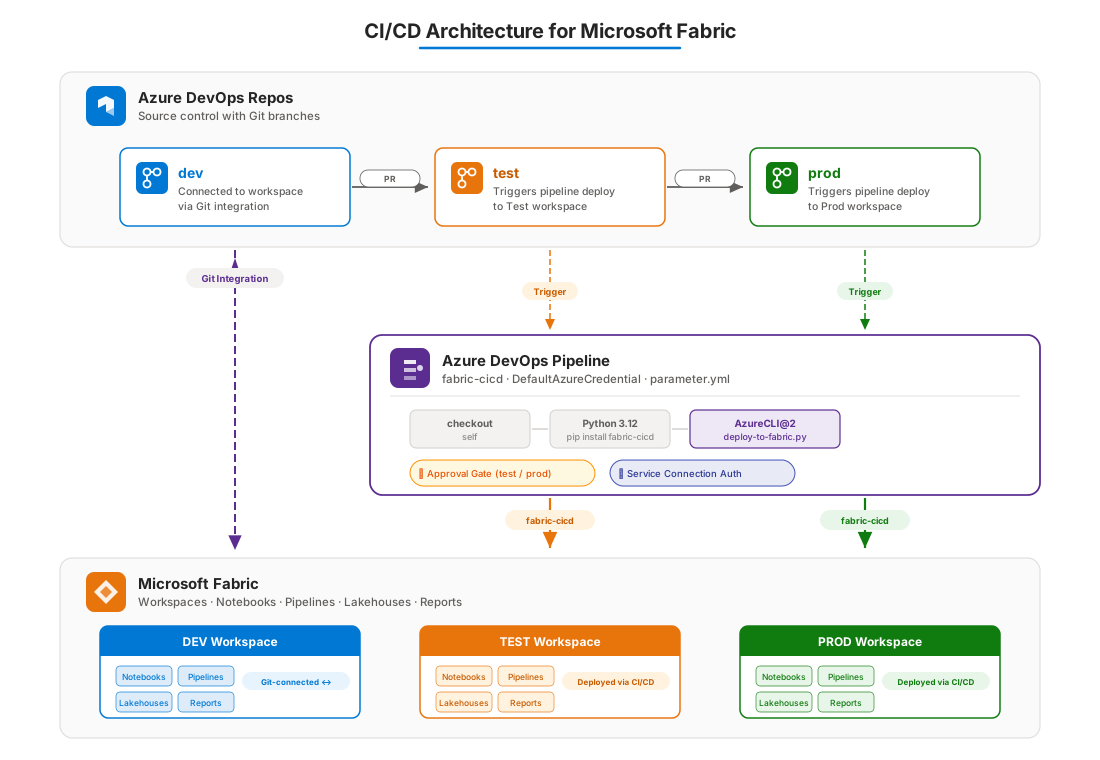
Workspaces in Microsoft Fabric are containers where your items live. You can think of them like folders or projects. Each workspace holds Notebooks, Pipelines, Lakehouses, Reports, and other Fabric items. In a CI/CD setup, you typically have at least three workspaces: one for development which will always have Git integration enabled, one for testing, and one for production. Each workspace represents an environment, and each environment has its own data connections, its own Lakehouse GUIDs, and its own configuration.
Version control is how you track changes to your work over time. In this context, we use Git. Fabric has built-in Git integration that lets you connect a workspace to a Git repository. When you make changes in the workspace, those changes can be committed to a branch in the repository. This gives you a full history of what changed, when, and by whom. If something breaks, you can look at the commit history and understand what happened.
Branches are parallel versions of your codebase. In a typical CI/CD setup, you have a dev branch that is connected to your development workspace, a test branch that represents what should be deployed to the test environment, and a prod branch that represents production. Changes flow from dev to test to prod through pull requests and merges.
Deployment pipelines are the mechanism that takes your items from one environment and puts them into another. In the approach we will cover in Part 2, this is handled by Azure DevOps pipelines combined with the fabric-cicd Python package. The pipeline triggers automatically when code is merged into a branch, authenticates against the Fabric API, and deploys the items to the target workspace.
Where CI/CD fits inside Microsoft Fabric
Microsoft Fabric is a unified analytics platform. It brings together data engineering, data warehousing, real-time analytics, data science, and business intelligence into a single product. Under the hood, everything runs on OneLake, which is the unified storage layer.
From a CI/CD perspective, the important thing to understand is that Fabric items have definitions that can be serialized and stored in Git. A Notebook, for example, is not just something that lives in the browser. Its definition, including the code cells, the configuration, and the metadata, can be exported to files and committed to a repository. The same goes for Data Pipelines, Semantic Models, and other item types.
Fabric's Git integration is the bridge between the workspace and the repository. You connect your development workspace to a branch, and from that point on, changes flow bidirectionally. You can make a change in the workspace and commit it to Git, or you can make a change in Git and sync it to the workspace. This is what unlocks the entire CI/CD workflow.
The key architectural decision is this: only the development workspace is connected to Git directly. The test and production workspaces are not connected to any branch. Instead, they receive their items through automated deployments. This is intentional. The test and prod branches in your repository serve as a record of exactly which versions of your items have been promoted to each environment. The actual deployment is handled by the fabric-cicd package, which reads item definitions from the repository, applies environment-specific configuration, and pushes them to the target workspace through the Fabric REST API.
Choosing a CI/CD Workflow Option
Microsoft documents several CI/CD workflow options for Fabric. You can find the full comparison here: Choose the best Fabric CI/CD workflow option for you. In short,
- Option 1: is fully Git-based with a dedicated branch per stage and direct uploads via Fabric Git APIs.
- Option 2: adds build environments on top of Git, where scripts modify item definitions before deployment, this is the approach we use in this series with the
fabric-cicdPython package. - Option 3: uses Fabric's built-in deployment pipelines to move items directly between workspaces.
- Option 4: targets ISVs who manage separate workspaces per customer. Many teams end up with a hybrid approach. In Part 2, we go hands-on with Option 2.
The Full Process: From Development to Production
If you are just getting started, the full process is simpler than it sounds. Here is how it works step by step.
A developer makes a change in the Dev workspace, for example editing a Notebook or updating a Data Pipeline. Once the change is ready, it gets committed to the dev branch through Fabric's Git integration. That is all the developer needs to do.
From there, a pull request is created from dev to test. A teammate reviews the changes, and once approved, the PR is merged. That merge triggers the CI/CD pipeline in Azure DevOps, which picks up the changes, runs the deployment script, and pushes the items into the Test workspace automatically. If there is an approval gate on the test environment, the pipeline waits for someone to approve before it proceeds.
The same thing happens when moving from test to production. Another PR from test to prod, another review, another merge, another pipeline run targeting the Prod workspace. Each step is controlled and traceable.
  Developer makes change in Dev Workspace
         │
         ▼
  Commit to dev branch (Git Integration)
         │
         ▼
  Pull Request: dev ──> test
         │
         ▼
  Pipeline deploys to Test Workspace
         │
         ▼
  Pull Request: test ──> prod
         │
         ▼
  Pipeline deploys to Prod Workspace
That is the entire loop. Dev for building, test for validating, prod for serving. Branches track what is where. Pipelines do the heavy lifting. Approval gates keep things safe.
The Challenge: Environment-Specific Configuration
There is one important wrinkle that makes Fabric CI/CD a bit more involved than, say, deploying a web application. Fabric items often contain hardcoded GUIDs that are specific to the environment they were created in.
For example, a Notebook might use the %%configure magic command to attach to a specific Lakehouse. That configuration includes the workspace ID, the Lakehouse ID, and the SQL endpoint ID. These are GUIDs, and they are different in every environment. The Lakehouse in your development workspace has a different ID than the Lakehouse in your test workspace, even if they have the same name.
If you deploy the Notebook from dev to test without changing these GUIDs, the Notebook will try to connect to the dev Lakehouse from the test workspace. That is not what you want.
The solution is parameter files. The fabric-cicd package supports a parameter.yml file that defines find-and-replace rules. You tell it: "whenever you see this dev workspace ID, replace it with the target workspace ID." The package also supports dynamic tokens like $workspace.$id and $items.Lakehouse.DemoLakehouse.$id that resolve automatically at deployment time. This means you do not have to manually maintain a mapping of GUIDs for every environment. The package figures it out.
We will look at the exact syntax and configuration in Part 2, but the concept is straightforward. Parameter files are the mechanism that makes environment-specific deployments possible without manual intervention.
What Is Coming in Part 2
In this first part, we covered the fundamentals: why CI/CD matters, how Fabric Git integration works, the flow from dev to test to prod, the different workflow options Microsoft provides, and environment-specific configuration challenges.
In Part 2, we will get practical. We will set up Azure DevOps with Key Vault integration, variable groups, environments with approval gates, and a branching strategy. Then we will go through the pipeline YAML line by line, the Python deployment script, and the parameter file that handles GUID replacement. By the end of Part 2, you will have everything you need to build a working CI/CD pipeline for Microsoft Fabric.
If you are just starting out, my advice is to not overthink it. Set up three workspaces, connect the dev workspace to a Git branch, create a simple pipeline, and deploy one Notebook. Once that works, add more items, add parameter files, add approval gates. Build up gradually. The goal is not perfection on day one; the goal is having a repeatable process that your team can trust.
Stay tuned for Part 2!