
2 posts tagged with "Deployment"

View All Tags

· 10 min read
Hasan Gural

Hello Folks,

Welcome to the Part 2. In Part 1, we covered the fundamentals of CI/CD for Microsoft Fabric: why it matters, how workspaces and branches map to environments, the flow from dev to test to prod, and the common mistakes to avoid. Now it is time to get practical.

In this part, we will set up everything you need in Azure DevOps to build a working CI/CD pipeline for Fabric. We will go through variable groups, environments with approval gates, the pipeline YAML, the Python deployment script, and the parameter file that handles GUID replacement across environments. By the end, you will have a clear picture of how all the pieces connect.
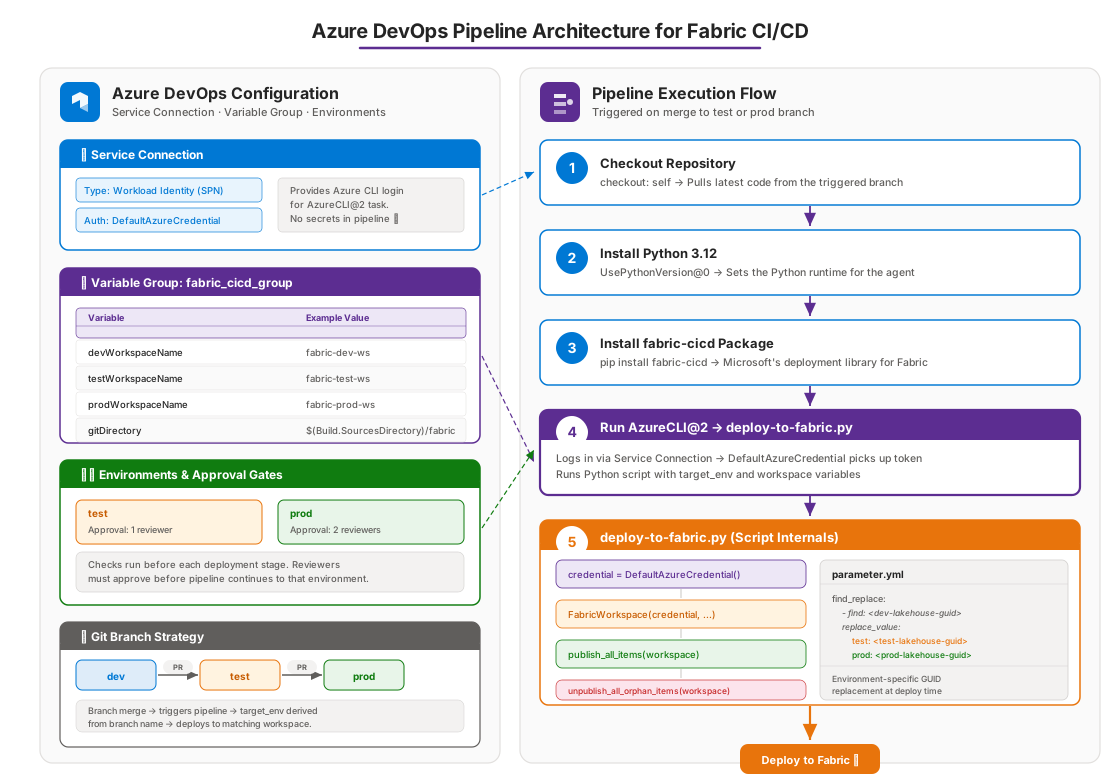
Azure DevOps Pipeline Architecture for Fabric CI/CD

· 9 min read
Hasan Gural

Hello Everybody,

In these two series, I want to walk you through how CI/CD works for Microsoft Fabric deployments. This is a topic that comes up a lot, and I think the best way to understand it is to start from scratch and build up step by step. In this first part, we will cover the fundamentals: what CI/CD means in the context of Fabric, why it matters, and how the basic building blocks fit together. In Part 2, we will go hands-on with Azure DevOps, the fabric-cicd Python package, parameter files, and a full end-to-end deployment walkthrough.

If you are working with Microsoft Fabric and your team is still deploying things manually, copying items between workspaces, or making changes directly in production, this article is for you.