
Hello Folks,
In this article, we will walk through a very serious problem that I have seen in multiple Azure environments in my customers: an Azure environment where outbound firewall rules allowed access to any Azure Storage account on the internet.
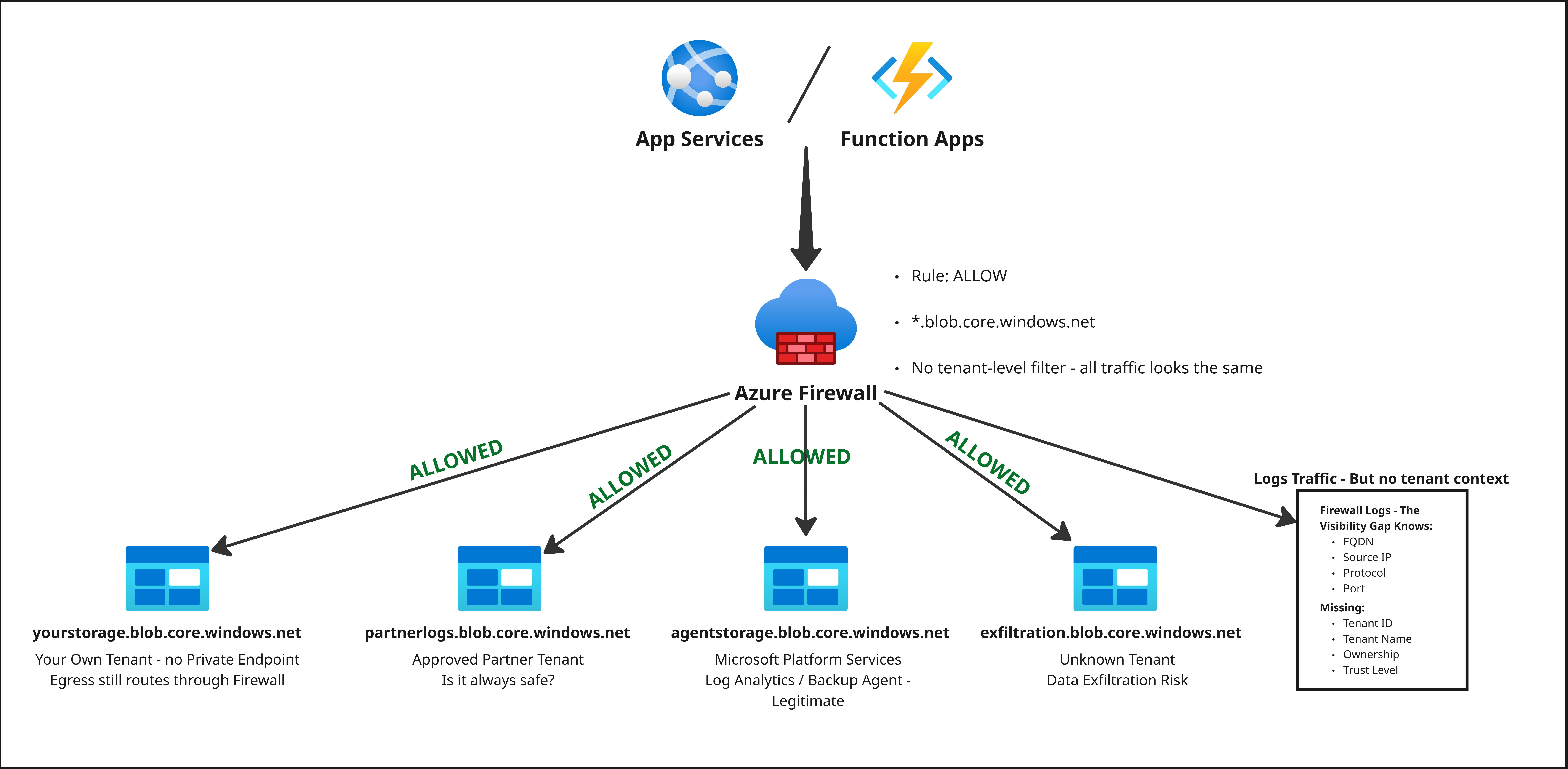
On the surface, the rule looked safe enough: outbound access was limited to Azure Storage endpoints. In reality, this meant that any storage account in any tenant was reachable, as long as it lived behind a standard *.blob.core.windows.net or *.dfs.core.windows.net style FQDN. From a data exfiltration perspective, this is a big red flag. Any workload that can send HTTPS traffic to arbitrary storage accounts can quietly move data out of your tenant, and that traffic is almost indistinguishable from normal storage operations.
The key questions I wanted to answer were simple to state but hard to solve at scale:
- Which storage accounts are being accessed?
- Which Azure tenants do they belong to?
- Who owns those tenants, and are they expected?
Azure Firewall logs gave me the FQDNs, but they did not tell me anything about tenant ownership. Manually resolving each storage account to its tenant is not scalable. To close that gap, I built a script that generates controlled traffic to those storage accounts, captures tenant IDs, and resolves them to tenant names so that I can see exactly where my data might be going.
From this point on, I will focus on how we actually get those tenantIds from the storage account traffic we already have: starting from Azure Firewall logs, feeding a script, and ending up with a clean mapping of "which storage account belongs to whom and what". Think of this article as Part 1 of the story, where we stay close to the traffic and discovery side. In a follow-up, we can move on to dashboards, alerting and governance.
Understanding the Problem
Let me start with the environment itself. Outbound access was governed by Azure Firewall application rules not by network rules. The application rules were configured with a simple pattern:
Allow outbound HTTPS traffic to Azure Storage endpoints eg: (
*.blob.core.windows.net)
The intention was good: keep egress restricted to Azure services and avoid wide-open internet access. However, in a multi-tenant cloud world, "Azure Storage" is not a single trusted zone. It is a shared service used by countless tenants, each with its own security and ownership model. What I wanted was not just another restriction rule, but visibility. I needed a way to map storage FQDNs seen in firewall logs to Azure tenants and, from there, to a human-friendly tenant name.
The Security Concern
Broad outbound rules that allow access to any Azure Storage account are dangerous because they effectively break a key trust boundary: your tenant vs. every other tenant.
When you say allow everything under *.blob.core.windows.net", you are not just allowing your own storage accounts. You are also allowing:
- Storage accounts in partner tenants
- Storage accounts in test or lab tenants
- Storage accounts in completely unknown tenants
From the firewall's point of view, all of these look the same. They are just FQDNs under the same Azure Storage domain. Over time, this turns into an implicit trust model: if it is Azure Storage, it must be fine. For data exfiltration, that assumption is simply wrong. An external tenant's storage account is no more trustworthy than an arbitrary HTTPS endpoint.
Without tenant-level visibility, you cannot tell whether:
- Data is staying inside your own tenant boundary
- Data is going to an approved external tenant
- Data is quietly flowing to a tenant you have never heard of
This lack of differentiation is exactly where the risk hides.
Using Azure Firewall Logs
Azure Firewall logs are still my first stop whenever I want to understand egress behavior. With application rules in place, the logs give you:
- Source IP, ports, and protocols
- Destination IP and ports
- FQDNs for outbound connections
For storage traffic, that means log entries like:
mystorageaccount.blob.core.windows.netbackupstore01.blob.core.windows.netsomecompanylogs.dfs.core.windows.net
From these logs, I can build an inventory of which storage accounts my workloads are actually talking to. With a bit of KQL, it's easy to pull out a list of distinct FQDNs and their usage frequency.
The problem is that the logs stop there. There is no field that tells you:
- Which tenant owns
mystorageaccount.blob.core.windows.net - Whether that tenant is yours, a partner, or an unknown
The firewall sees network traffic and DNS names, not Azure AD tenant context. So even though I had detailed logs, I still did not know where those storage accounts lived in terms of tenant boundaries.
Why Identifying Tenant Ownership Is Difficult
On paper, identifying the tenant behind a storage account sounds easy. In practice, at scale, it is not.
Here are the main reasons:
- The FQDN does not encode tenant information. It only exposes the storage account name and the standard Azure Storage suffix.
- There is no single public endpoint that you can call with a storage FQDN and get back a tenant ID in a nice, clean response.
- You cannot rely on Azure Resource Graph or similar inventory tools because they only know about resources in your own tenant. They have no visibility into storage accounts in other tenants.
- In many cases, workloads must communicate with Microsoft-managed Azure platform services over egress traffic, log analytics backup agents that use Microsoft-managed storage accounts. From a firewall perspective, this traffic also targets *.blob.core.windows.net, making it hard to distinguish legitimate platform activity from potential cross-tenant storage access.
For one or two suspicious storage accounts, you can get away with manual inspection: send a test request, look at headers, open dev tools, or try a few API calls from your own session. When you are dealing with hundreds or thousands of distinct FQDNs extracted from Azure Firewall logs, that manual approach collapses immediately.
What you really need is something that can:
- Take a list of storage FQDNs from your logs
- Generate controlled, minimal traffic to each one
- Capture any tenant-related information in the responses
- Normalize that into a clean mapping of FQDN > tenant ID > tenant name
Without automation, analysts are left with spreadsheets, ad hoc scripts, and a lot of copy-paste. That is not sustainable. In the next part of this article, I will try to build a script that does exactly that: takes the FQDNs, generates traffic, and extracts tenant information in a way that can be easily consumed for reporting and alerting.
Stay tuned for Part 2!