
4 posts tagged with "Storage"

View All Tags

· 10 min read
Hasan Gural

Hello Friends,

Welcome back to the Part 4. In the first three parts of this series, we built a complete pipeline: Part 1 explained the security problem and why tenant visibility matters, Part 2 showed the PowerShell technique for resolving storage FQDNs to tenant IDs using the WWW-Authenticate header, and Part 3 connected Azure Firewall logs through KQL queries to feed that script automatically.

The pipeline we have so far produces a report with an FQDN, a tenant ID, and an IsOwnTenant flag. That is useful, but it leaves two practical gaps. First, tenant IDs are GUIDs: machine-readable, but not something a security team can act on. When a report tells you that eight storage accounts belong to an unknown tenant, you want a name, not a GUID. Second, the report is a manual one-time snapshot. In practice, you want something that flags new unknown tenants as they appear in your firewall traffic without anyone having to remember to run a script.
· 8 min read
Hasan Gural

Welcome back to the Part 3. In Part 1, We covered the security concern behind broad outbound firewall rules and explained why tenant visibility matters. In Part 2, We have walked through the PowerShell script that takes a list of storage FQDNs and resolves each one to a tenant ID using the WWW-Authenticate header trick.

The script is ready. The missing piece is the list itself. In a real environment you are not going to type out FQDNs with your hands; you are going to pull them from Azure Firewall logs. That is what this part covers. I will walk through both Azure Firewall log formats, show the KQL queries I use to extract storage FQDNs from each, and then connect the output directly to the script so the full pipeline runs end to end.

· 10 min read
Hasan Gural

Hello Friends,

Welcome back to the Part 2 of this series. In Part 1, we walked through the security concern behind broad outbound firewall rules that allow access to any Azure Storage account, and explained why FQDNs visible in Azure Firewall logs do not tell you anything about tenant ownership. I also outlined the plan: extract storage FQDNs from your firewall logs, generate controlled traffic to each one, and use the HTTP response to extract a tenant ID that can be mapped to an owner.

In this part, we will go deeper into the actual mechanics. I will show you exactly how the tenant ID discovery technique works under the hood, walk through the PowerShell scripts that I have built, and then we will move into Azure Firewall logs with some KQL queries that will help you get from raw log data to a clean list of FQDNs ready for analysis.

· 6 min read
Hasan Gural

Hello Friends,

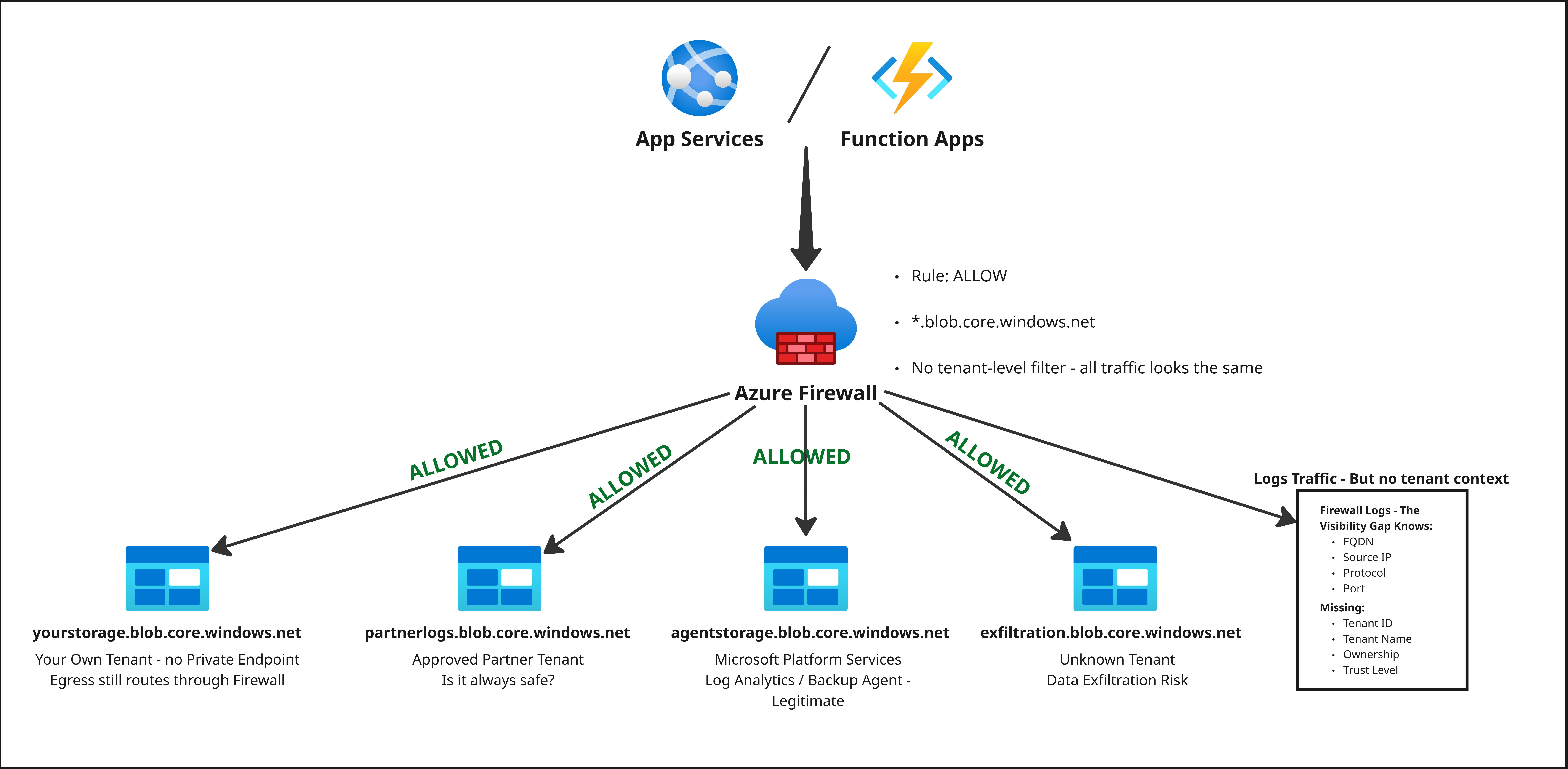
In this article, we will walk through a very real problem that I have seen in multiple Azure environments in my customers: an Azure environment where outbound firewall rules allowed access to any Azure Storage account on the internet.

GlobalBootCamp2025

On the surface, the rule looked safe enough: outbound access was limited to Azure Storage endpoints. In reality, this meant that any storage account in any tenant was reachable, as long as it lived behind a standard *.blob.core.windows.net or *.dfs.core.windows.net style FQDN. From a data exfiltration perspective, this is a big red flag. Any workload that can send HTTPS traffic to arbitrary storage accounts can quietly move data out of your tenant, and that traffic is almost indistinguishable from normal storage operations.